Zoom-in: DNS
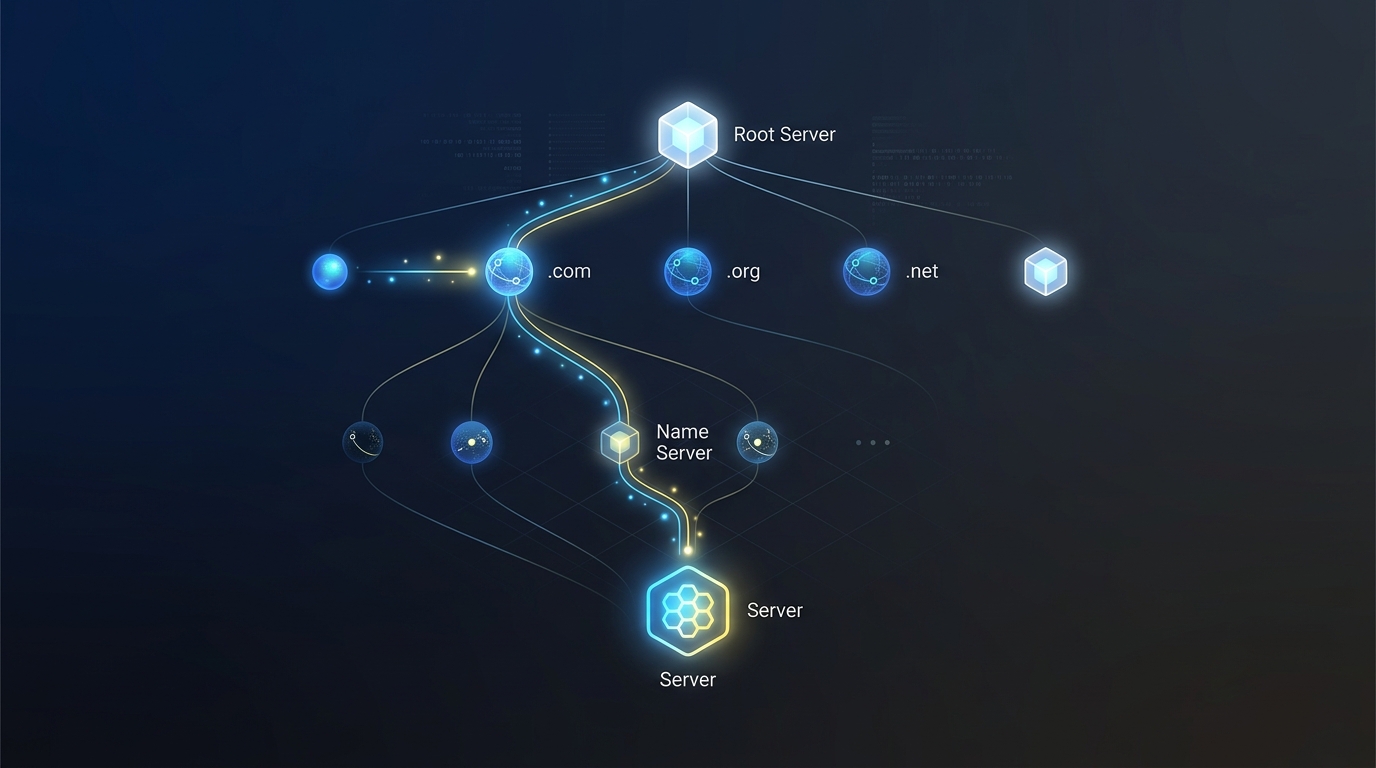
Type google.com, press Enter. Your machine doesn't understand google.com — it only understands IP addresses like 142.250.185.46. That one simple action triggers a chain of lookups across multiple servers before the browser can send a single byte.
Zoom in.
Layer 1 — Browser cache: ask the nearest source first
Every time DNS returns a result, the browser stores it alongside its TTL.
graph LR
    B["💻 Browser"] -->|"google.com?"| BC["📦 Browser cache"]
    BC -->|"142.250.185.46 (45s left)"| B
    style B fill:#1e3a5f,stroke:#3b82f6,color:#93c5fd
    style BC fill:#3b2a1a,stroke:#f59e0b,color:#fcd34d
TTL is set by the domain owner. A short TTL (60s) allows fast IP changes. A long TTL (86400s) reduces DNS load but slows propagation when an update is needed.
Layer 2 — OS cache: a shared lookup layer
The operating system maintains a DNS cache shared by all processes on the machine.
graph LR
    B["💻 Browser"] -->|"google.com?"| BC["📦 Browser cache\n(miss)"]
    BC -->|"not found"| OS["🖥️ OS DNS cache\n(systemd-resolved / mDNSResponder)"]
    OS -->|"142.250.185.46"| B
    style B fill:#1e3a5f,stroke:#3b82f6,color:#93c5fd
    style BC fill:#3b2a1a,stroke:#f59e0b,color:#fcd34d
    style OS fill:#3b2a1a,stroke:#f59e0b,color:#fcd34d
On Linux, systemd-resolved manages this cache. On macOS it's mDNSResponder. The /etc/hosts file is checked at this layer — and it takes priority over any DNS server. That's why adding 127.0.0.1 myapp.local to /etc/hosts works instantly, no DNS query needed.
Layer 3 — Recursive resolver: the proxy that asks on your behalf
When the local cache misses, the OS sends a query to a recursive resolver — typically the ISP's DNS or a public one like 8.8.8.8 (Google) or 1.1.1.1 (Cloudflare).
graph LR
    OS["🖥️ OS"] -->|"google.com?"| R["🔄 Recursive resolver\n8.8.8.8"]
    R -->|"cache hit → 142.250.185.46"| OS
    style OS fill:#1e3a5f,stroke:#3b82f6,color:#93c5fd
    style R fill:#3b2a1a,stroke:#f59e0b,color:#fcd34d
The recursive resolver is the entity that does the heavy lifting — caching results for millions of clients. If someone else already asked for google.com within the TTL window, the resolver answers immediately from cache without any further queries.
Layer 4 — The resolution chain: asking from the root down
When the recursive resolver has no cache, it walks the DNS tree hierarchy to find the answer.
sequenceDiagram
    participant R as Recursive Resolver
    participant Root as 🌐 Root Nameserver
    participant TLD as 📂 TLD Nameserver (.com)
    participant Auth as 📋 Authoritative NS (google.com)

    R->>Root: who manages .com?
    Root-->>R: TLD nameserver: a.gtld-servers.net

    R->>TLD: who manages google.com?
    TLD-->>R: ns1.google.com, ns2.google.com

    R->>Auth: google.com → IP?
    Auth-->>R: 142.250.185.46 (TTL: 300s)

    R-->>R: cache for 300s
Three steps — three different servers:
- Root nameservers (13 clusters operated by ICANN and major organizations): know which nameserver manages each TLD (
.com,.io,.vn...) - TLD nameservers (Verisign for
.com): know which nameserver manages each domain within that TLD - Authoritative nameservers (configured by the domain owner, typically Cloudflare, Route 53...): hold the final IP address
After this step, the resolver caches the result for the TTL duration. Every subsequent client query gets answered from cache.
Full picture
sequenceDiagram
    participant B as Browser
    participant BC as Browser Cache
    participant OS as OS Cache + /etc/hosts
    participant R as Recursive Resolver
    participant Root as Root NS
    participant TLD as TLD NS
    participant Auth as Authoritative NS

    B->>BC: google.com?
    BC-->>B: miss

    B->>OS: google.com?
    OS-->>B: miss

    B->>R: google.com?

    alt Cache hit at resolver
        R-->>B: 142.250.185.46
    else Cache miss
        R->>Root: where is .com?
        Root-->>R: a.gtld-servers.net
        R->>TLD: where is google.com?
        TLD-->>R: ns1.google.com
        R->>Auth: google.com → IP?
        Auth-->>R: 142.250.185.46 (TTL 300s)
        R-->>B: 142.250.185.46
    end

    Note over B,Auth: Browser caches the result per TTL
Takeaway
DNS is a hierarchy, not a flat lookup table. Each layer caches results independently according to its own TTL — browser, OS, resolver. When a DNS change is deployed, propagation is slow because every cached layer must expire on its own TTL, not the new record's TTL.
When debugging DNS issues: check /etc/hosts first → then dig @1.1.1.1 (bypasses the ISP resolver) → then dig +trace (walks the tree from root). Each step eliminates one cache layer from the picture.
This post was assisted by Amy 🌸 - AI Assistant. Content has been reviewed by the author.
Related Posts
Zoom-in: WebSocket
Your chat app updates instantly without reloading the page. How WebSocket breaks free from the one-way limits of HTTP.
Zoom-in: TCP
Every HTTP request runs on TCP — but before the first byte of real data crosses the wire, three packets are exchanged carrying no data at all. TCP solves the problem the Internet doesn't.
Zoom-in: Load Balancer
One domain, millions of requests per day. A load balancer doesn't just split traffic — it decides routing, health checking, and session management for the entire system.